Grok Bot integration
Endpoints
- MCP
- https://revora-ai.com/api/agent/v1/mcp
- REST
- https://revora-ai.com/api/agent/v1/*
- Guide
- /agents.md
Setup
- 1
Prepare Revora
Connect LinkedIn and complete My Product before the Bot has anything true to say.
- 2
- 3
Add Revora as a plugin
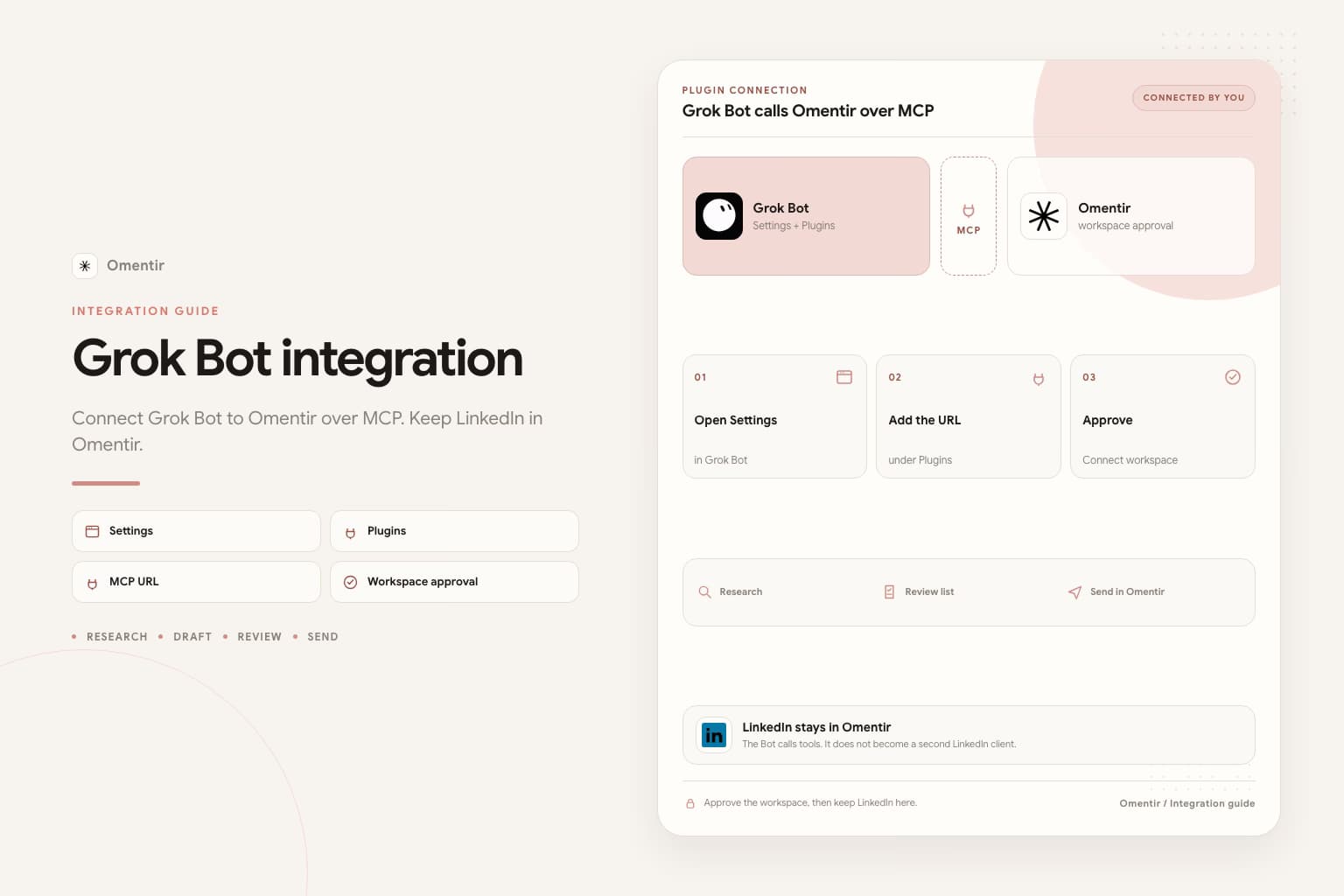
Settings, Plugins, custom MCP at https://revora-ai.com/api/agent/v1/mcp. Approve Connect workspace.
- 4
Forbid LinkedIn on the Bot computer
If it asks you to take over for a LinkedIn password or CAPTCHA, refuse. Point it at MCP tools.
This is Grok Bot, not grok.com chat
Grok Bot is SpaceXAI's early-beta teammate product, launched August 11, 2026. Each Bot runs on a persistent cloud computer with a browser, filesystem, and terminal. You message it like a coworker. It keeps working after you close the laptop.
That is a different product from Grok chat on grok.com. Chat Grok uses a custom MCP connector in Settings. Grok Bot uses Settings, then Plugins, and it can also drive websites by clicking them. The second path is the one that gets LinkedIn accounts into trouble.
What Grok Bot should do in this stack
Grok Bot is good at overnight research, scoring a CRM view against a written ICP, and drafting notes in a voice you already approved. SpaceXAI's own sales-outbound example stops at a review list. Do not send. Do not enroll anyone.
Revora is the LinkedIn workspace: My Product, lead finders, Steal Customers, paced campaigns, and reply drafts. Grok Bot calls those tools over MCP. It does not become a second LinkedIn client.
How to connect
Finish Revora first: account, LinkedIn connection, My Product. Install the Grok Bot desktop app (macOS or Windows) or the iOS app. You need SuperGrok Heavy, Cursor Ultra, or Cursor Teams Premium. In Grok Bot, open Settings, then Plugins, and add the Revora MCP URL. Sign in on Revora when the browser asks, and approve Connect workspace.
Grok Bot shares MCP authentication with Cursor. If your team uses an MCP allowlist, add https://revora-ai.com/api/agent/v1/mcp there. If the plugin UI wants a header instead of a sign-in, create a revocable key on the API page and send Authorization Bearer. Do not paste that key into a group chat with other Bots.
- MCP URL: https://revora-ai.com/api/agent/v1/mcp
- Prefer plugin sign-in over pasting a token
- Optional first instruction: https://revora-ai.com/agents.md
- Linux desktop is not currently a Grok Bot app. Use macOS, Windows, or iOS.
A first sales job that stops at review
Give the Bot one written ICP, one source (a CRM view or a Revora lead group), and a hard stop: return a scored list and drafts. Do not send. Then open Revora, check the agent config, and start a small campaign with conservative daily limits.
If you only say "go find me pipeline," the Bot will invent targeting. If you name the role, company size, geography, and the trigger, the list is something you can actually read in the morning.
Do not let the cloud browser drive LinkedIn
Grok Bot can sign into sites that have no MCP. That is useful for an internal dashboard. It is a bad idea for LinkedIn. A cloud VM clicking Connect and typing DMs is the pattern LinkedIn already treats as automation. You also shared that login with every other Bot on the same computer.
Keep LinkedIn signed in only inside Revora. If the Bot asks you to take over the computer for a LinkedIn password, two-factor code, or CAPTCHA, refuse and point it back at the MCP tools.
A first Grok Bot session that does not invent targeting
Write the ICP the way you would brief a contractor: role, company size, geography, trigger, and who to skip. Then ask the Bot to run get_context and list_agents before create_agent. Have it show the finder config. Start a campaign only after you have read twenty leads.
SpaceXAI's own outbound prompt tells the Bot not to send and not to enroll. Keep that sentence in the Bot description. Overnight research is useful. Overnight sending from a new account is how you buy a restriction. Paste this, replace the brackets, keep the last two sentences.
Paste into Grok Bot
You are the sales outreach manager for my company. Your job is to run LinkedIn outreach with Revora.

My product helps [buyer] get [result]. Best-fit accounts are [company type, size, region]. Strong signals: [signal]. Skip [bad fit].

Work only through Revora MCP. Start with get_context, then list_agents. If no finder matches this ICP, show me a create_agent config and wait.

Pull up to 30 people. For each one write fit 1-5, the evidence, any risk, and a two-sentence draft that cites a real trigger. If a note could fit two buyers, rewrite it.

Do not send. Do not enroll. Do not sign into LinkedIn.
Leave a review list by morning.
When Grok Bot is the wrong operator
Skip Grok Bot if you do not already pay for Cursor Ultra, Cursor Teams Premium, or SuperGrok Heavy. The product is in beta and the plans are not cheap. A founder who only needed a hosted LinkedIn workspace can use Revora from Overview without an extra agent layer.
Skip it if you wanted grok.com chat. That is the Grok integration. Skip it if you cannot sit with the review list in the morning. An always-running Bot you never read is just a more expensive way to ignore your pipeline.
Frequently asked questions
No. The Grok integration page is grok.com chat. This page is the Grok Bot app: persistent Bots, a shared cloud computer, and Plugins for MCP.
Yes, after My Product is complete and LinkedIn is connected in Revora. Pass competitor LinkedIn company URLs and optional founder or employee profile URLs. Do not ask it to invent sources.
Not if the plugin can complete Revora workspace approval in the browser. Use a Bearer key only when the client has no sign-in path and you can store the token outside the prompt.
SpaceXAI lists SuperGrok Heavy, Cursor Ultra, and Cursor Teams Premium. Enterprise access is a waitlist. Grok Bot is still in beta.
Connect your operator to a real sales workspace
Revora holds the LinkedIn connection and safety limits. Your AI configures agents and inspects results.
Prefer markdown? Grok Bot integration.md